
OPD queue management system.
The screen calls the room, not a counter number — Ophthalmology, Pediatrician, Neurology, X-Ray, Phlebotomy. One token is forwarded from registration to the consulting room, the lab, the pharmacy and billing, so a patient queues once for a whole visit. It is our LCD Wireless platform, configured for a hospital.
Two screens from installed systems
The row in red is the token being called right now, announced by voice at the same moment. Everything on these screens — the column headings, the department names, the footer line, your logo — is yours to set, and to change when a clinic day changes.

The OPD screen

The lab screen
What a hospital needs that a counter system does not give
The screen calls a name, not a number
A hospital corridor has rooms and facilities, not counters. This system puts the token against a name the patient can read — Ophthalmology, Pediatrician, Neurology, X-Ray, Phlebotomy, Radiology, or the doctor's own name — because a patient who cannot tell which room is theirs asks the nurse, and the nurse stops working.
One token for the whole visit
Without forwarding, a single OPD visit means queueing four times: registration, consultation, lab, pharmacy. The token is forwarded instead, and the patient keeps their place through the building on one number.
The elderly are called first, automatically
A token taken at the senior-citizen or priority button is called ahead of the ordinary queue without anyone at the counter deciding it — so the rule is visible, and staff are not arguing about it in front of a waiting hall.
The waiting is finally measurable
Every token is timed from issue to call, at every stop. Instead of an opinion about OPD crowding you get the average wait per department, the longest wait of the day and the hours the load actually falls.
One token, five stops
This is the whole argument for the system in one picture: the token is issued once and forwarded, so the patient keeps their place through the building instead of rejoining a new line at every door.
- 1
Registration
The patient takes a token at the kiosk, or the registration desk issues it. The desk then forwards that token to the department the patient is going to — Ophthalmology, Cardiology, a named doctor.
- 2
Consultation
The OPD screen calls the token against the room, with a voice announcement in your language. The doctor or the nurse calls the next patient from the counter unit or from the mobile app inside the room.
- 3
Lab & imaging
The consultation forwards the same token to Phlebotomy, X-Ray or Radiology. The lab screen calls it by facility — the patient walks across and waits for the same number, not a new one.
- 4
Pharmacy
The prescription sends the token on to the pharmacy counter, where it is called again on the same number. Nobody stands at the window to ask whether their medicines are ready.
- 5
Billing & discharge
The last hop is billing or insurance. By then the system has the whole visit: every counter the token passed, and the wait at each one.
Forwarding, recall, SMS and parallel screens
Call forwarding
Registration or the consulting room picks the next destination and forwards the token — from the calling unit or the app. It is called at the next point on the same number, and the hop is recorded.
Missed-token recall
A patient who stepped out is not lost. An unanswered token moves to a missed list on the calling unit, in the app and, if you want, on the screen — and can be called back at any time.
SMS tokens
The token can go to the patient by SMS, with a message as their turn approaches, so an attender can wait in the canteen or the car park instead of in front of the display.
Parallel displays
One system drives several screens — the OPD corridor, the lab waiting area, the pharmacy counter and the first floor, each showing its own queues or repeating the same ones.
Your departments, named by you
A queue on this system is whatever your OPD calls it — a department, a facility, a room or a doctor. The name is free text, it appears beside the token on every display, and it is spoken in the voice announcement. Capacity: 15 departments on one screen of the tab kiosk, 30 across a swipe, up to 100 configured. We recommend 30, because past that a patient spends longer finding their department on the kiosk than they would have spent in the line.
- Name every queue in free text — Cardiology, X-Ray, Radiology-2, Dr. Meena
- Rename a department on a clinic day, when the visiting doctor changes
- Give each department its own serial range, so two patients never hold one number
- Map several rooms or counters to one department, and merge them when a room closes
- Reset one department on demand, or let every queue reset at midnight
- Add, hide or reorder departments as the OPD schedule changes
- Set the announcement language — English or any Indian regional language
- Carry your hospital name, logo and footer line on every screen
Every one of those is a setting in the app on the tab, not a service call — an OPD changes doctors, rooms and clinic days far more often than anyone expects at the time of purchase, so none of it is locked to us.

The kiosk

The settings app
Three ways to run an OPD queue
An OPD does not have to take the LCD platform. All three of our queue models call patients in an outpatient department — they differ in how they reach the display and in what the display can show.

LCD Wireless — in a hospital laboratory
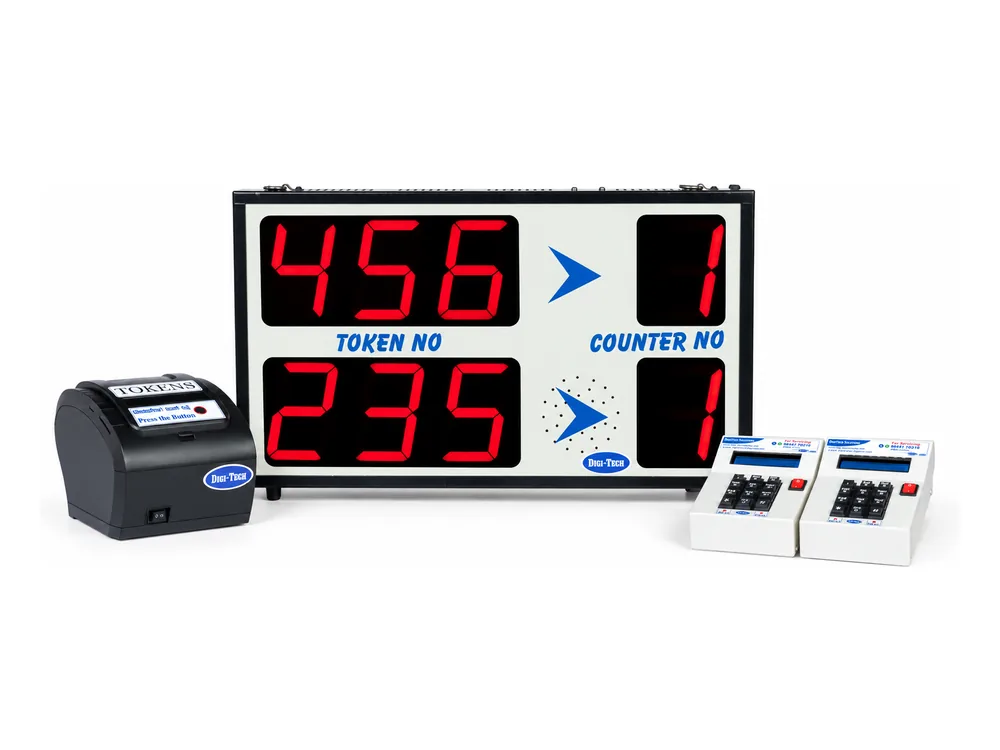
LED Wireless — no cabling at all
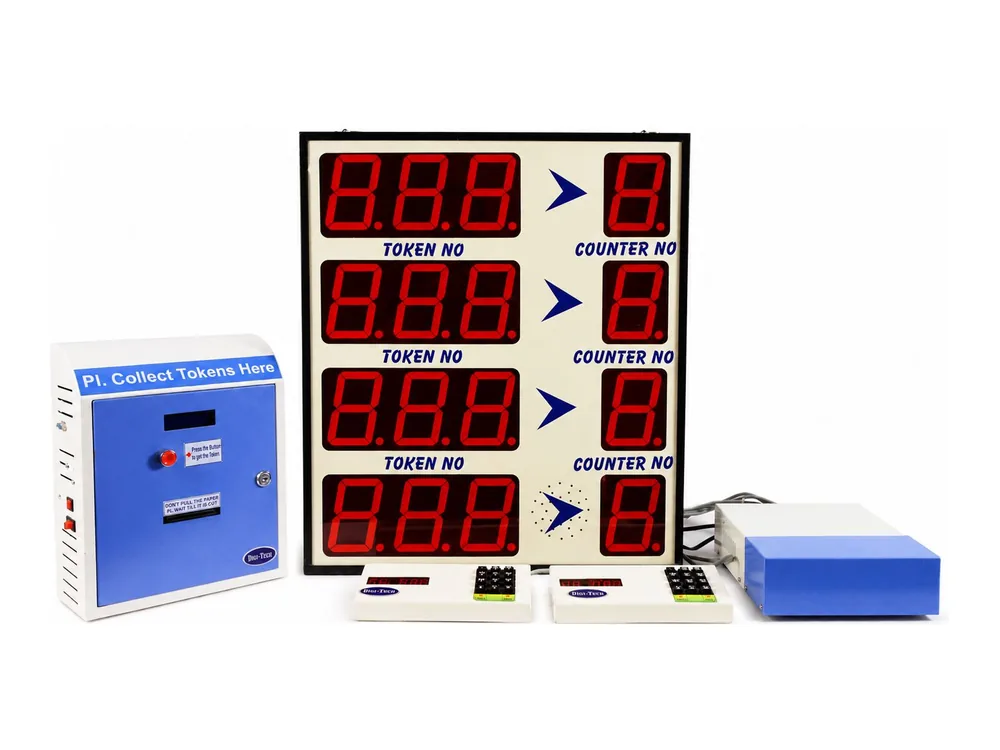
LED Wired — on 6-core cable
The difference that matters in a hospital: the LED models show numbers, so they suit a pharmacy, a billing hall or a sample-collection counter. Only the LCD platform on this page can put Ophthalmology or a doctor's name beside the token, and only it forwards one token from department to department.
The hardware
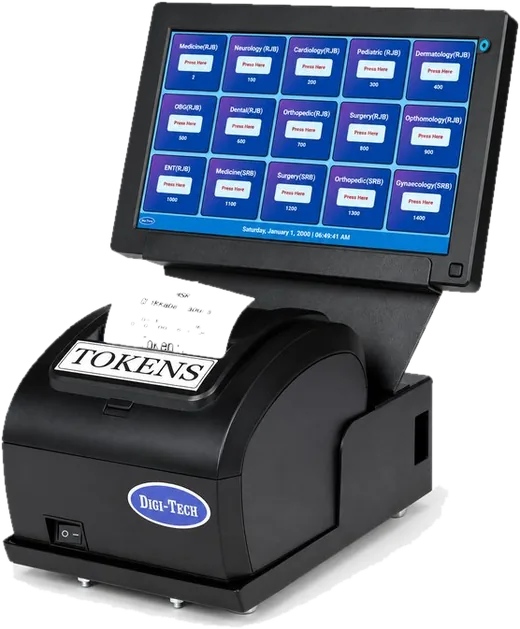
The tab kiosk
In the lobby, on a floor stand, a table top or a wall mount, with the thermal printer beneath it — or skip it and let registration issue the token.
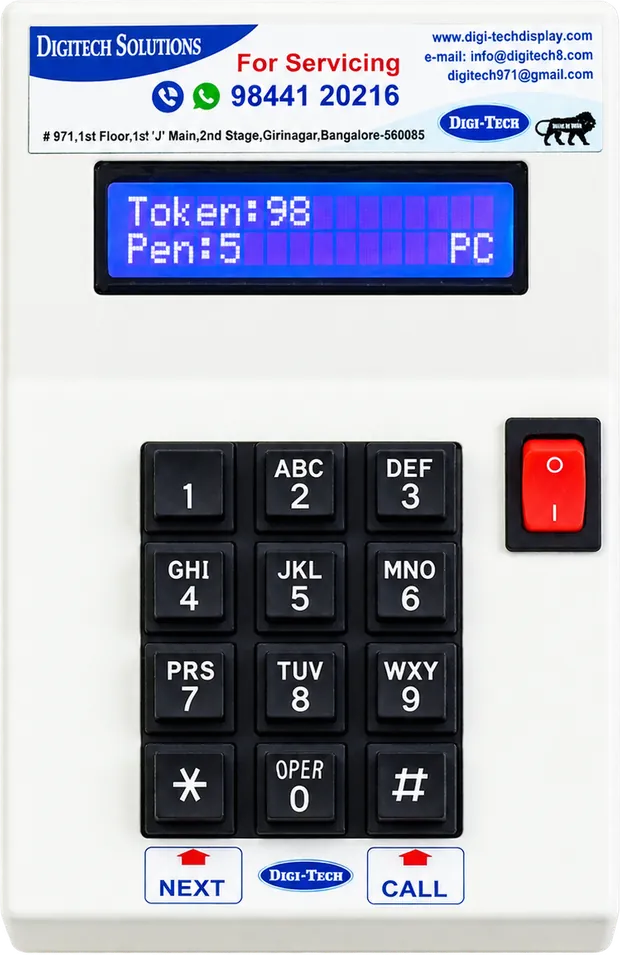
The calling unit
On the consulting room desk or the pharmacy counter. Its 2×16 LCD shows the present token, how many are pending and whether it is connected.

The mobile app
Call the next patient, recall a missed token and forward to the next department from a phone — for a doctor who wants nothing on the desk.
The screens
Any LCD or LED television you already own, or ones we supply — one per waiting area, all driven by the same system.
The mini server
A small machine in your building holds the queues and every token record. Nothing about your patients leaves the hospital.
Our router
It creates the network the kiosk, screens, printers and calling units run on. Your IT department adopts nothing.
Printer & token
Our thermal printer with auto-cut and a paper-end sensor, on 55 mm / 55 GSM rolls. The token carries your name and the department.
Token dispensers & rollsWhere the screens go in the hospital
OPD corridor
The main screen outside the consulting rooms, calling the token against the room.
Inside the consulting room
A small screen or the mobile app, so the doctor calls the next patient without leaving the chair.
Sample collection
The lab screen calls by facility — Phlebotomy, X-Ray, Radiology — where the queue is longest first thing in the morning.
Pharmacy counter
The same token called again when the prescription is ready.
Billing & insurance
The last stop, on the same number, with the wait recorded like any other.
Split screen
Half the screen for tokens, half for your own health-awareness video, notices or department timings.
How long patients actually waited
Every token is recorded from the moment it is issued — where it went, when it was called, how long it waited and how many points it passed through. The running average wait can sit in the footer of the display itself, so the hall can see it too.
Per token
- Token number and department
- Issued date and time
- Last-call time
- Total wait, per token
- Hops — how many points it passed through
- Last counter or room visited
Across the OPD
- Tokens issued, by department
- Average patient waiting time
- Longest wait of the day
- Average hops per visit
- Waiting-time trend across OPD hours
- Load per department and per room
Cuts we are asked to build
- Footfall by hour and by day
- Room and counter productivity
- Average service time per room
- Missed and recalled tokens
- Department comparison, week on week
- A custom cut, built for your review
Everything downloads as CSV for any date range from the server in your building — no cloud account, no per-seat licence, no patient data leaving the hospital — and where you want the numbers in a dashboard, your HIS or HMS, we build that integration.

Token journey

The day at a glance
On every queue system we make
Priority calling
Senior citizens, differently-abled patients and emergencies take a priority token and are called to the room first, automatically.
Automatic queue merging
Two rooms can serve one department, and queues merge when a room closes — nobody waits in front of an empty chair.
Midnight reset, own serial ranges
Tokens reset at 12 AM, configurable, and each department can run its own range so two patients never hold the same number.
Voice in your language
English and every Indian regional language, with a built-in speaker, volume control and an on/off switch for a room not in use.
The token is your letterhead
Date, time, department, token number, hospital name and contact number — printed on every token and customisable.
Hardware you own
No subscription and no per-counter licence. It runs on a server in your building and keeps calling tokens whether your internet is up or not.
The configuration, in full
- Model
- LCD Wireless Queue Management System — the LCD platform, configured for hospitals
- Display
- Any LCD or LED television — scrolling, 4-line, 6-line, constant or split screen
- Queues
- 15 departments on a screen, 30 on a swipe, configurable to 100 — we recommend 30
- Queue names
- Free text — department, facility, room or doctor's name, shown beside the token
- Rooms & counters
- Configurable, with flexible room and counter mapping
- Token issuing
- Tab touchscreen kiosk — floor, table-top or wall mount — or issued at the registration desk
- Printers
- Our thermal printer (6 queue buttons, auto-cut, paper-end sensor) · POS printer (2 queues) · POS printer connected to the tab
- Paper roll
- 55 mm / 55 GSM with end sensor on our printers · 72 mm / 50 GSM on tab and POS printers
- Calling
- 2×16 LCD counter unit with keypad — present token, pending tokens and connectivity — or the mobile calling app inside the room
- Patient flow
- Call forwarding between departments, missed-token recall, SMS tokens, parallel displays
- Network
- A network our own router creates — not your hospital Wi-Fi, and no internet needed
- Power
- A 220 V point at each unit, on our own 5 A plug
- Announcement
- English and all Indian regional languages
- Reports
- Token journey and waiting-time analytics on an on-site server, downloadable for any period; cloud or HIS/HMS integration on request
When a hospital does not need this
One doctor, one room
A single clinic room needs a number on a wall, not a platform. Our token display system does that for a fraction of the cost.
Numbers are enough
A pharmacy or a billing hall where nobody needs department names is better served by LED Wireless — a 7-segment display, cheaper, and readable much further down a corridor.
You want it in the ward
Queues are an outpatient problem. For the inpatient side — bedside calls, pull-cords, Code Blue — the right product is our nurse calling system.
Hospital queue management — common questions
What is an OPD queue management system?
An OPD queue management system replaces the crowd outside a consulting room with a token and a screen. The patient takes a token at registration, sits down, and is called to a room by name — Ophthalmology, Pediatrician, Neurology — with a voice announcement, in the order tokens were issued, with senior-citizen and priority tokens called first. In a hospital it is also searched as a patient queue management system, an OPD token display system or a hospital token system.
Can one token take a patient from registration to the pharmacy?
Yes, and this is the feature hospitals actually buy it for. Registration forwards the token to the consulting room; the room forwards it to the lab, to imaging, to the pharmacy or to billing. It is called at each point on the same number, so the patient never stands in a second queue for a second token. Every hop is recorded, so the report shows how many points a visit passed through and how long the whole journey took.
Can the display show the doctor's name and the room number?
Yes. The screen shows the token against free text you control — a department, a facility, a room number or an individual doctor's name — and you change it yourself from the settings app when a clinic day or a visiting doctor changes. The 7-segment LED models cannot do this; they show numbers only, which is why hospitals take the LCD platform.
Does it run on our hospital Wi-Fi, and can it talk to our HIS?
It runs on a network our own router creates, so your Wi-Fi carries none of it, your IT department adopts nothing, and tokens keep being issued and called through an internet outage. Reports sit on a server in your building; where you want them elsewhere, we build an integration to your cloud or to your HIS/HMS. Only SMS tokens need an outbound connection.
How are senior citizens and emergencies called first?
A priority button on the kiosk issues a priority token, and the system calls it ahead of the ordinary queue without anyone at the counter overriding anything. Because the rule is in the system rather than in a person's judgement, it is visible to everyone in the waiting hall and staff are not left defending it.
What does it give us for a NABH or patient-experience review?
Measured waiting, rather than an estimate. Every token carries its issue time, last-call time, total wait and the counters it passed, and the analytics give average waiting time, longest wait, load per department and the trend across OPD hours — downloadable for any date range. That is the evidence a patient-experience or accreditation review asks for; the system does not itself certify anything.
Send us your OPD, we will specify it
Tell us the departments, the rooms and where the screens should go. A specified quotation comes back within one business day — from the company that built India's first integrated queue management system in 2001, installed at Manipal, Sakra, Fortis, Narayana, Aster and NIMHANS.