
LCD Wireless queue management system.
The screen shows a name, not just a number — Cardiology, X-Ray, Passbook Entry, a doctor's own name. A tab kiosk issues the token, a mobile app can call it, one token carries a patient from registration to billing, and the wait behind every token is measured. Formerly sold as the Advanced (Wireless) model — same platform, clearer name.
Names, not just numbers
A 7-segment LED board can show a token and a counter. It cannot show Radiology-2. In a hospital that difference decides whether a patient walks to the right door: a token called to “Counter 3” means nothing to someone who has never been in the building before, while a token called to “Cardiology” needs no explaining. The same is true of a bank hall running passbook entry, cash and account opening side by side.
So this model drives an ordinary LCD or LED television, over a network our own router creates. Everything that makes the other two dependable is here — priority calling, queue merging, voice announcements, the same keypad — and on top of it sit the things only a screen with names and a tab can do.
What it asks for in return is a socket at every unit, and a little more commissioning than a board that only counts.

Four parts, nothing between them
The router is the middle of this system the way the control box is on the wired model — except that what reaches the other units is radio, not copper.
- 1
The visitor presses a queue
A tab kiosk in the lobby shows the queues by name — Cardiology, X-Ray, Passbook Entry, a doctor's name. One press prints the token from the printer beneath it.
- 2
Our router carries it
Every unit joins a network our own router creates. Nothing touches your Wi-Fi, nothing needs the internet, and your IT department has nothing to adopt.
- 3
The display calls it by name
The token appears against the counter or room it is called to, with a voice announcement — scrolling, four-line, six-line, constant or split screen.
- 4
Staff call from the counter, or a phone
A calling unit with a 2×16 LCD sits on the counter, or staff call from the mobile app — useful where one person moves between counters.
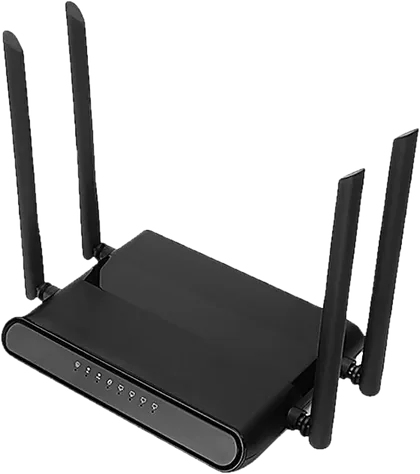
The router comes with the system
It creates the network the kiosk, printer, display and calling units run on — so joining your Wi-Fi is not a prerequisite, your IT department adopts nothing, and tokens keep being issued and called through an internet outage. Only SMS tokens reach outside.
What arrives on site
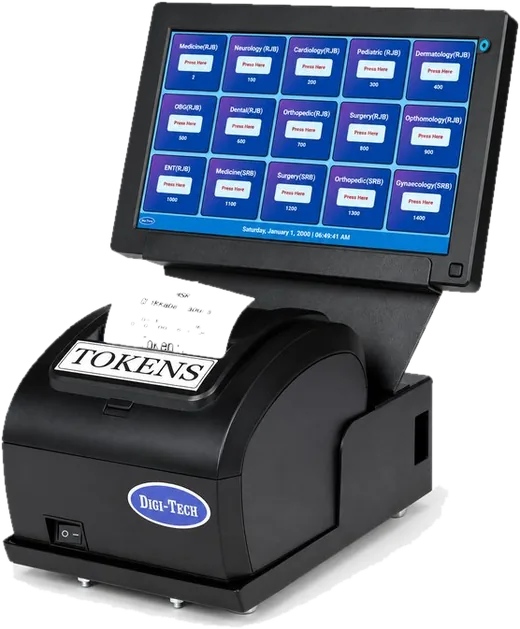
The tab kiosk
A touchscreen with the queues laid out as tiles and the printer directly beneath it. Fifteen queues fit on a screen and a swipe brings the next fifteen; it can be configured to a hundred, though we recommend thirty — beyond that people spend longer looking for their department than they would have spent in the line.
Floor mount
ATM-style pedestal for an open lobby, with the printer in the body of the stand.
Table top
On the reception counter, where a person can guide first-time visitors.
Wall mount
At the entrance where floor space is scarce and the queue forms on arrival.
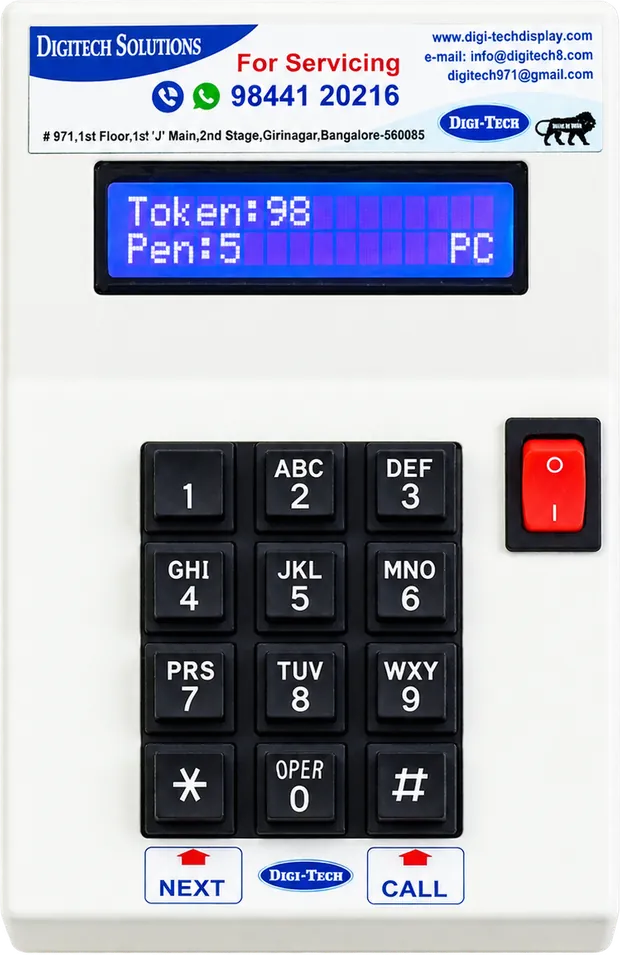
The calling unit
The same unit as the LED Wireless model: a 2-line, 16-character LCD showing the token this counter is serving, how many are still pending in that queue, and whether the unit is connected to the router.
- NEXT calls the following token, CALL repeats it
- Key a number to call any token out of turn
- Built-in speaker, volume control, on/off switch
- Any counter can be mapped to any queue
Three ways to print the token
Our own thermal printer carries six queue buttons on its face, cuts each token automatically and senses the end of the paper roll before it runs out mid-queue. A POS printer is the lower-cost option and runs two queues. Or the POS printer sits under the tab and prints whatever the tab sends it, which is how sites with many named queues are usually built.
Paper is 55 mm / 55 GSM on our thermal printers and 72 mm / 50 GSM on tab and POS printers, both with an end sensor. Why the roll matters.

You name them, and you rename them
Queues are named in the settings app on the tab, by your own staff. A clinic that adds a visiting cardiologist on Thursdays, a bank that splits passbook entry from cash, a lab that opens a second sample counter at eight in the morning — none of that is a service call to us.
- Name every queue — Cardiology, X-Ray, Dr. Meena, Passbook Entry
- Give each queue its own serial range
- Reset a single queue without disturbing the others
- Carry your name and logo on the display, and your own footer text
- Add, hide or reorder queues as departments and clinic days change


Five ways to arrange the screen
The same system drives any LCD or LED television. How the screen is laid out depends on the room — a bank hall reads differently from a single consulting room — and it is set at commissioning, not fixed at the factory.
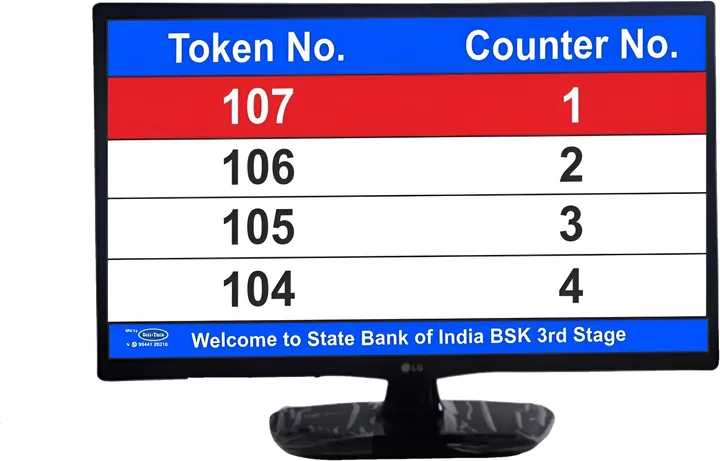
Scrolling list
Tokens scroll in the order they were called — the arrangement most banks use.
Four-line
The token being served on top, the three called before it below, largest type.
Six-line
More history on screen for a busy hall where people look up late.
Constant
One token and one counter, very large, for a single-counter room.
Split screen
Tokens on one half, your own video, notices or rate board on the other.
Parallel displays
Several screens off one system — the same queues in the lobby and upstairs, or a different set on each.
A unit on the counter, or a phone in a pocket
The counter unit is above. The app does the same job from a phone — useful in diagnostic centres and branches where one person covers more than one counter, or where the counter has no room for another box.

- Next Token and Recall for that counter
- Call a token number manually, out of order
- Forward the current token to another queue
- The waiting list — tap any token to call it
- Every action mirrored on the public display
What the LED models cannot do
A patient arriving at a hospital is not in one queue, they are in four. Without forwarding they take a token at registration, a second at the OPD, a third at the lab and a fourth at billing — four lines, four numbers, and no way of telling anyone how long the whole visit took.
Call forwarding
Registration picks the destination queue and forwards the token — from the calling unit or the app. It is called at the next counter on the same number, so the patient never queues twice.
Missed-token recall
A token that is not answered goes onto a missed list instead of vanishing — on the calling unit, in the app and, if you want, on the display. Any of them can be called back.
SMS tokens
The visitor gets the token by SMS and can be told as their turn approaches, so they can wait in the canteen rather than in front of the screen. It works alongside the printed token.
Parallel displays
Several screens off one system — the same queues repeated in the lobby and on the first floor, or a different set on each screen.
SMS is the one feature that needs an outbound connection. Everything else runs whether your internet is up or not.
What the system knows after the token is served
Every token is recorded from the moment it is issued to the moment it is last called. Two views come out of that — the journey of individual tokens, and the numbers across the whole branch — both downloadable as CSV for any date range, and the cut is built to what you want to measure.

- Token number and queue
- Issued date and time
- Last-call time
- Total wait, per token
- Hops — how many counters it passed
- Last counter visited

- Tokens issued
- Average waiting time
- Longest wait
- Average hops per token
- Waiting-time trend across the day
- Queue load, queue by queue
The reports run on a server in your building
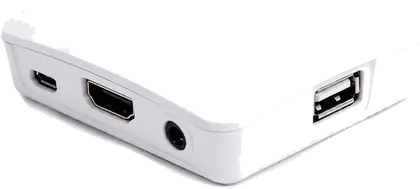
A mini server on site holds the record of every token, and the reports are opened in a browser over your own network — no cloud account, no per-user licence, no footfall or patient data leaving the premises. The display can also carry the running average wait in its footer, from the day's tokens.
On site is the default, not the limit: the same data can be pushed to your own cloud or integrated with your HIS, lab system, core banking or BI dashboard — scoped per project.
Included here, and on both LED models
None of this is an upgrade or a licence. It is how every queue system we build behaves.
Priority calling
Also called preferential calling: a token taken at a senior-citizen or priority button is called to the counter first, automatically.
Automatic queue merging
Several counters can serve one queue, and queues merge when a counter closes — nobody stands in a dead line in front of an empty seat.
Midnight reset, own serial ranges
Tokens reset automatically at 12 AM, configurable, and each queue can run its own range so two people never hold the same number.
Voice in your language
English and every Indian regional language, with a built-in speaker, volume control and an on/off switch for a counter not in use.
The token is your letterhead
Date, time, type of service, token number, organisation name and contact number — printed on every token and customisable.
Hardware you own
No subscription, no per-counter licence. It runs on site and keeps calling tokens whether your internet is up or not.
LCD Wireless in numbers
| Display | Any LCD or LED television — scrolling, 4-line, 6-line, constant or split screen |
|---|---|
| Queues | 15 on a screen, 30 on a swipe, configurable to 100 — we recommend 30 |
| Counters | Configurable, with flexible counter and room mapping |
| Queue names | Free text — department, service or doctor's name, shown with the token |
| Token issuing | Tab touchscreen kiosk — floor, table-top or wall mount |
| Printers | Our thermal printer (6 queue buttons, auto-cut, paper-end sensor) · POS printer (2 queues) · POS printer connected to the tab |
| Paper roll | 55 mm / 55 GSM with end sensor on our printers · 72 mm / 50 GSM on tab and POS printers |
| Calling unit | 2×16 LCD with numeric keypad — present token, pending tokens and connectivity status, built-in speaker, volume control, on/off switch — or the mobile calling app |
| Only on this model | Call forwarding, missed-token recall, SMS tokens, mobile calling app, parallel displays, reports |
| Network | A network our own router creates — not your Wi-Fi, and no internet needed |
| Power | A 220 V point at each unit, on our own 5 A plug |
| Announcement | English and all Indian regional languages |
| Token reset | Automatic at 12 AM, configurable; per-queue serial ranges |
| Reports | Token journey and wait-time analytics, on an on-site server, downloadable for any period |
When this is not the model to buy
This is the most capable of the three, which does not make it right for every counter. Two cases where a cheaper model is the better engineering decision:
You only need numbers
A branch with four counters and no departments to name does not need a screen that can say “Cardiology”. LED Wireless calls the same tokens on a 7-segment display, with the same keypad and voice, for less — and it is just as wireless.
LED WirelessYou want the fewest powered points
Here every unit needs a 220 V point. On LED Wired only the control box and the printer do — one 6-core cable feeds the rest — which is often the deciding factor in an old building where sockets are scarce.
LED WiredSee the full comparison of all three models side by side.
LCD Wireless — common questions
How many queues can the LCD queue management system handle?
Fifteen queues fit on one screen of the tab kiosk, and a swipe brings the next fifteen — thirty in normal use. It can be configured up to a hundred, but we recommend thirty: past that, a visitor spends longer hunting for their department than they would have spent in the line. Counters are mapped flexibly against those queues.
Can the display show department or doctor names instead of numbers?
Yes — that is the reason this model exists. The screen shows the token against a name: Cardiology, X-Ray, Radiology-2, Passbook Entry, or an individual doctor's name. On the LED models the screen is 7-segment, so it can show numbers only.
Does it need our Wi-Fi or an internet connection?
No. Our own router creates the network the kiosk, display, printer and calling units run on. Your Wi-Fi carries none of it, your IT department adopts nothing, and the system keeps issuing and calling tokens through an internet outage. Only SMS tokens need an outbound connection.
Who changes the queue names — do we have to call you?
You do it yourself, from the settings app on the tab. Rename a queue, give it a serial range, reset one queue without touching the others, change the footer text, your name or your logo. Clinics change doctors and departments far more often than anyone expects at the time of purchase, which is why this is not locked to us.
Can one token carry a patient from registration to OPD?
Yes. Registration forwards the token to the OPD, the lab, the pharmacy or billing, and it is called there on the same number — the patient never queues again for a second token. Every hop is recorded, so the reports show how many counters a token passed through and how long the whole journey took.
What reports does the LCD system give us?
The journey of every token — issued time, last-call time, total wait, hops and last counter — and live KPIs across the branch: tokens issued, average waiting time, longest wait, average hops per token, the waiting-time trend across the day and the load on each queue. Reports download as CSV for any date range from a server in your own building, and we build the cut you ask for.
Name your queues, and we will quote it
Send us the counters, the queues and where the screens go. A specified quotation comes back within one business day — from the company that built India's first integrated queue management system in 2001.