
LED wireless queue management system.
No cabling between units and no request for your Wi-Fi. The router comes with the system and makes a network of its own, so a working hall gets a token management system without a single cable tray or an IT ticket.
For a hall that is already open
A branch that is trading, an OPD seeing patients, a government counter with a line at the door — none of them can give you a week of cable trays and opened ceilings. This model asks for nothing structural. Units are placed, plugged in and joined to the network our router creates, and the hall is calling tokens the same day.
It is also the answer when the customer's network is the obstacle. Most wireless queue systems want to join your Wi-Fi, which turns a counter problem into an IT project: a VLAN, a security review, a helpdesk ticket every time the password changes. Ours brings its own network and leaves yours alone.
What you give up is sockets. Every unit needs a 220 V point where it stands, because nothing is being fed down a cable. Where sockets are scarce, the wired model needs only two.
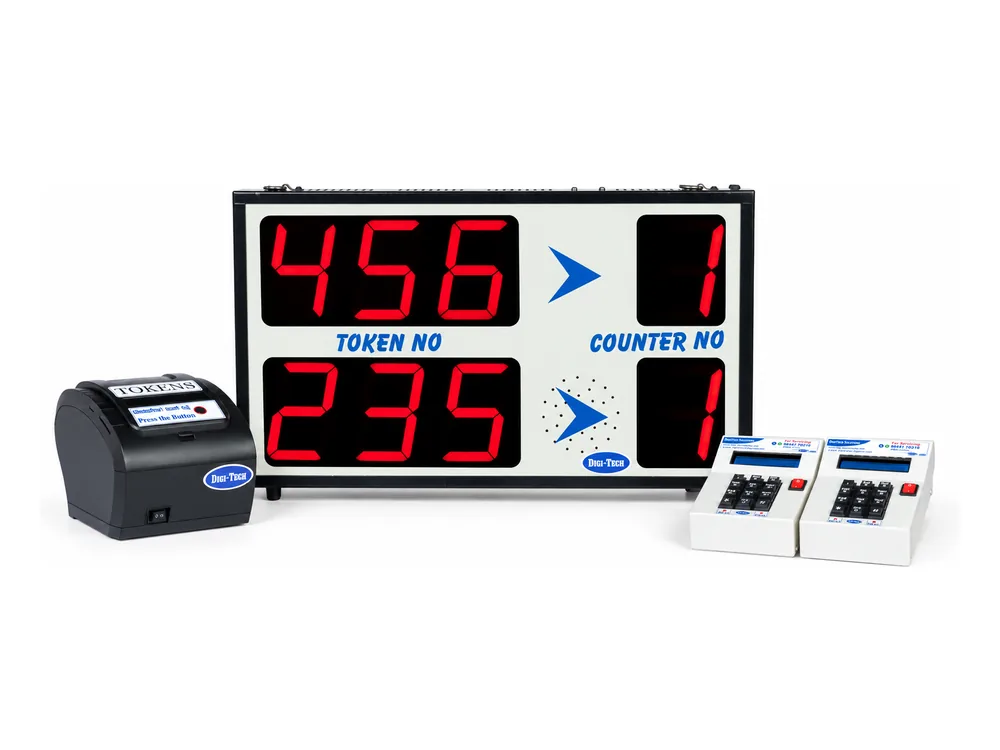
Four parts, nothing between them
The router is the middle of this system the way the control box is on the wired model — except that what reaches the other units is radio, not copper.
- 1
Our router makes the network
The router ships with the system and creates a network of its own. Your Wi-Fi is not asked for, your IT department adopts nothing, and there is no password to re-enter when yours changes.
- 2
The visitor takes a token
Our thermal printer carries up to six queue buttons on its face and cuts each token automatically. Its own display shows whether it is connected, so a jam and a dropout never look alike.
- 3
The board calls the number
Up to five lines of token and counter on a 7-segment board, with the voice announcement at the counter. Nothing runs to the board but its power lead.
- 4
Every unit takes a socket
That is the trade for having no cable: the display, the printer and each calling unit need a 220 V point of their own. If sockets are scarce, LED Wired is the better engineering answer.

The router comes with the system
It creates the network the printer, display and calling units run on. Joining your Wi-Fi is not a prerequisite, no internet connection is required, and the system keeps issuing and calling tokens when your broadband is down. Nothing in it appears on your LAN for anyone to audit.
A screen that answers the two questions
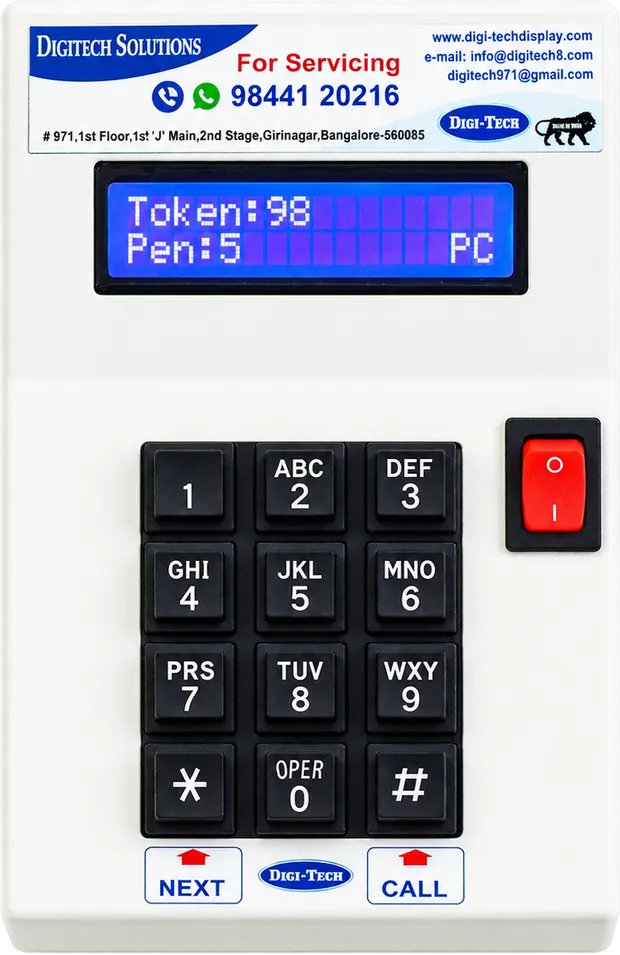
The calling unit carries a 2-line, 16-character LCD, and it spends those two lines on what a counter clerk actually needs to know: which token is being served, how many are still waiting in that queue, and whether the unit is connected to the router.
That last one matters more on a wireless system than on a wired one. When a unit stops responding, the clerk can see whether the link has dropped or whether nobody has taken a token — and the answer decides whether to call us or carry on.
- 2 lines of 16 characters — the token being served and the queue behind it
- Connectivity status, so a clerk can see the link is live without asking
- Numeric keypad: next, recall, or call any token out of turn
- Built-in speaker with volume control
- On/off switch for a counter not in use
The printer shows it too
Our thermal printer has its own display and reports the same connectivity status. A printer that has dropped off the network and a printer that has jammed look identical from the front of a counter; this is how the staff tell them apart before they phone anyone.
Two printers, and the difference is real
The printer decides how many queues the hall can run, so this is the one choice worth thinking about before the order rather than after it.
Our thermal printer
Recommended- Up to 6 queues — six buttons on the printer face
- Automatic token cutting
- Paper-end sensor, with the roll warning on its display
- Connectivity status on the same display
- 55 mm / 55 GSM rolls made for it
A POS printer
- Up to 2 queues only
- Lower cost per counter
- No display — no roll warning
- No connectivity status
- 72 mm / 50 GSM rolls
Worth choosing when the hall runs one or two lines and the budget is the deciding factor. Past two queues it cannot do the job.

Either way the token carries date, time, type of service, token number, your organisation name and a contact number — customisable, because the token is the only piece of paper the visitor takes away with them.
Use the rolls made for the printer
Rolls are bought on price by somebody who will never see the printer, and then the printer fails and the system gets the blame. A roll with no end sensor strands a queue mid-token; an adhesive end tape melts across the heated plate and finishes the print mechanism outright. Ours carry an end sensor, so the printer warns you in time.
- 55 mm · 55 GSM · end sensor — our printers
- 72 mm · 50 GSM · end sensor — tab and POS
- Why the roll matters
Four counters, four boards, one system
A hospital pharmacy running four dispensing counters. Each window carries its own board showing the token it is serving, so a waiting patient reads the counter they are being called to rather than hunting along the row — and counter 4, reserved for senior citizens, discharge medication and emergency prescriptions, is served by the same priority calling that is standard on every model we build.

Included here, and on both other models
None of this is an upgrade or a licence. It is how every queue system we build behaves.
Priority calling
Also called preferential calling: a token taken at a senior-citizen or priority button is called to the counter first, automatically.
Automatic queue merging
Several counters can serve one queue, and queues merge when a counter closes — nobody stands in a dead line in front of an empty seat.
Midnight reset, own serial ranges
Tokens reset automatically at 12 AM, configurable, and each queue can run its own range so two people never hold the same number.
Voice in your language
English and every Indian regional language, through the calling unit's speaker, with volume control at the counter.
The token is your letterhead
Date, time, type of service, token number, organisation name and contact number — printed on every token and customisable.
Hardware you own
No subscription, no per-counter licence, nothing in the cloud. It runs on site and keeps running whether your internet does or not.
LED Wireless in numbers
| Cabling | None between units |
|---|---|
| Network | A network our own router creates — not your Wi-Fi, and no internet needed |
| Display | 7-segment LED, up to 5 lines |
| Counters | Configurable for up to 9 |
| Queues | Up to 6 on our thermal printer · up to 2 on a POS printer |
| Queue names | Numbers only — a 7-segment display cannot form words |
| Calling unit | 2×16 LCD with numeric keypad — present token, pending tokens and connectivity status, built-in speaker, volume control, on/off switch |
| Printers | Infra DigiTech thermal printer with connectivity display, six queue buttons and automatic cutting · or a POS printer (2 queues, no display) |
| Paper roll | 55 mm / 55 GSM thermal with end sensor on our printers · 72 mm / 50 GSM on POS printers |
| Token print | Date, time, type of service, token number, organisation name and contact number — customisable |
| Power | A 220 V point at every unit |
| Announcement | English and all Indian regional languages |
| Token reset | Automatic at 12 AM, configurable; per-queue serial ranges |
| Standard features | Priority / preferential calling, automatic queue merging |
| Installation | Plug and play — no cabling, no configuration on your network |
When this is not the model to buy
Two situations where the freedom from cable is not worth what it costs you:
Sockets are scarce
Here every unit needs its own 220 V point. In an older building that can mean more electrical work than the system is worth. LED Wired feeds the display and every calling unit down one cable and needs power in two places only.
LED WiredThe screen has to say a name
Cardiology, X-Ray, Passbook Entry, a doctor's name. A 7-segment board cannot form words — and call forwarding, the mobile app, SMS tokens and wait-time reports live on the LCD model, not here.
LCD WirelessSee the full comparison of all three models side by side.
LED Wireless — common questions
Does the wireless queue management system use our Wi-Fi?
No. The router ships with the system and makes a network of its own, which the display, the printer and every calling unit join. Your Wi-Fi is never asked for, nothing appears on your LAN, and there is no password for anyone to re-enter when yours is changed. It does not need an internet connection either — tokens keep being issued and called through an outage.
How much cabling does it need?
None between units. Each unit needs a 220 V socket where it stands, and that is the whole electrical scope. That is what makes this the model for a hall already in service: no cable tray over a working banking floor, no false ceiling opened in a live OPD, and a same-day install.
How many counters and queues can it handle?
Up to nine counters, with up to five lines on the display. Queues depend on the printer: up to six with our own thermal printer, which carries six queue buttons on its face, or up to two with a POS printer. Each queue can run its own serial range so two people in the hall never hold the same number.
How do we know a unit is still connected?
The calling unit says so. Its 2×16 LCD shows the token being served, the tokens still pending, and the connectivity status — so a counter clerk can see the link is live instead of wondering. Our thermal printer shows its connectivity too, which matters because a printer that has dropped off the network and a printer that has jammed look identical from the front.
What is the difference between your thermal printer and a POS printer here?
Our own thermal printer runs up to six queues, puts those six queue buttons on its face, cuts each token automatically, senses the end of the paper roll and shows its connectivity status. A POS printer is the lower-cost option: it runs two queues and has no display, so it cannot tell you about the roll or the link. Where a hall runs more than two lines, our printer is the one to specify.
What does the LED wireless queue management system cost?
It is quoted per site, because the count decides it: how many counters and queues, how many display lines, and which printer. There is no cabling in the quotation at all. Send your counter and queue count through the contact form and a specified quotation comes back within one business day.
No cable, no shutdown
Tell us how many counters and queues the hall runs. A specified quotation comes back within one business day — and the install does not close your floor.