
Bank queue management system.
A token at the door, a seat instead of a line, and any free counter calling the next customer — with senior citizens called first and the branch's live average waiting time on the screen. Built on our LCD Wireless platform, and running today in State Bank of India, Canara Bank and Karnataka Bank branches.
Two branch screens, photographed in service
The row in red is the token being called right now, announced by voice at the same moment. Along the bottom: the branch's live average waiting time in minutes, and a scrolling line you write yourself — a welcome, the branch name, a deposit offer.

Canara Bank

State Bank of India
In 2001 A. N. Venkatesh integrated a token dispenser with our token display — one of India's first integrated queue management systems. When State Bank of India introduced single-window banking, we designed and supplied its QMS rollout in 2003–04, starting at SBI Kumaraswamy Layout. The purchase orders are still on record, and the product has been in branches ever since.
Four things a token system changes at the counter
The branch's waiting time, on the screen
The footer of the display carries the live average waiting time in minutes, calculated from the branch's own tokens. A customer who can see eight minutes stops asking the guard how long it will be, and a branch that publishes the number tends to manage it.
Senior citizens and the differently-abled, called first
A priority button on the dispenser issues a priority token, and the system calls it ahead of the general queue without anyone at the counter overruling anything. The preference is in the system, visible to the hall, and recorded in the report — which is what a customer-service review asks about.
Any free counter, any waiting token
Single-window operations only work if the queue is not bound to one teller. Counters share a queue, a token goes to whichever counter frees up first, and when a counter closes for lunch its queue merges rather than stranding the people in it.
Numbers for the branch review
Tokens issued, average and longest wait, load by service and counter productivity — measured, not estimated, and downloadable for any period. Useful for internal customer-service review, and for a regional office comparing branches on the same basis.
One thing it is not: a compliance requirement. RBI mandates interest-rate, forex and service-charge display boards, not queue management. We make both, and we keep them apart in procurement — our RBI display board and queue management guide sets out which is which.
One queue, any free counter
Single-window operations fail at the counter when a token is bound to one teller. Here the queue belongs to the branch: the next token goes to whichever counter is free, a priority token goes first, and a counter that closes hands its queue back.
- 1
The door
The customer takes a token from the dispenser or the tab kiosk — general on one button, senior citizen on the other — and sits down instead of joining a line at the counter.
- 2
The wait
The display shows the tokens being served, the counter each one is at, and the branch's live average waiting time. The voice announcement repeats it in your language.
- 3
The counter
Whichever counter frees up first calls the next token from its calling unit — or from the mobile app, where one officer moves between desks.
- 4
The record
Issue time, call time, counter and total wait are written for every token. Nothing about the customer is held — a token is a number, not an account.
Running in branches today
A branch can take the LCD platform, which names the service and publishes the waiting time, or a 7-segment LED board, which is cheaper and readable the length of a banking hall. Both are ours, and both are photographed here where they work.

Canara Bank — LED Wireless

Karnataka Bank — LED Wireless
Which one a branch should take
Take the LCD Wireless platform where you want the service named on screen — Cash, Passbook, Account Opening — the average waiting time published, token forwarding between desks, SMS tokens and waiting-time reports for the regional office.
Take LED Wireless or LED Wired where the branch only needs token and counter numbers called clearly and cheaply — the pattern most co-operative and rural branches choose, and the one that reads furthest down a long hall.
Queue by the service the customer came for
On the LCD platform a queue carries a name you type — Cash, Passbook, Account Opening, Loans, Locker, Senior Citizen — shown beside the token and spoken in the announcement. Each service can hold its own serial range, several counters can share one service, and the branch manager changes any of it from the settings app rather than calling us.
A word of advice from installing these since 2001: keep a branch under ten queues. A customer who has to read a menu at the door is slower than the line they were avoiding.

The calling app

The settings app
Forwarding, recall, SMS and parallel screens
Token forwarding between desks
A customer sent from the teller to the relationship officer, or from account opening to the cash counter, carries the same token instead of taking a second one. Every hop is recorded.
Missed-token recall
A customer who stepped out to take a call is not lost — the unanswered token moves to a missed list on the calling unit and in the app, and can be called back at any time.
SMS tokens
The token can reach the customer by SMS with a message as their turn approaches — useful in a branch where the hall fills at lunchtime and on the first of the month.
Parallel displays
One system, several screens: the main hall, the locker room, the first floor, the loan desk — the same queues repeated or a different set on each screen.
The hardware
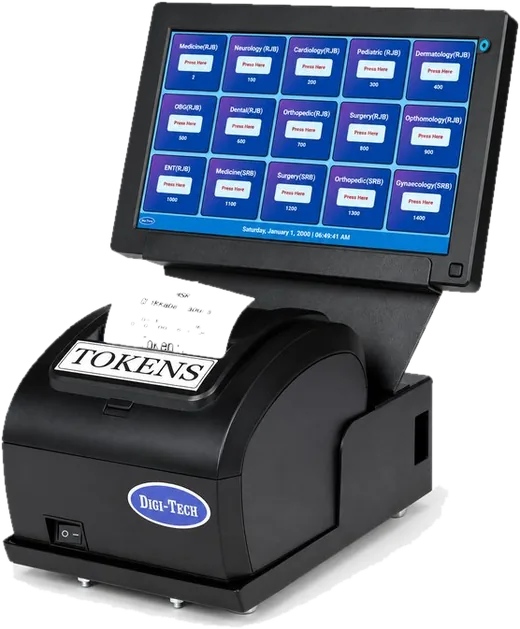
The kiosk or dispenser
A tab touchscreen kiosk on a floor stand, table top or wall mount — or the simple two-button dispenser most branches use, general on one button and senior citizen on the other.
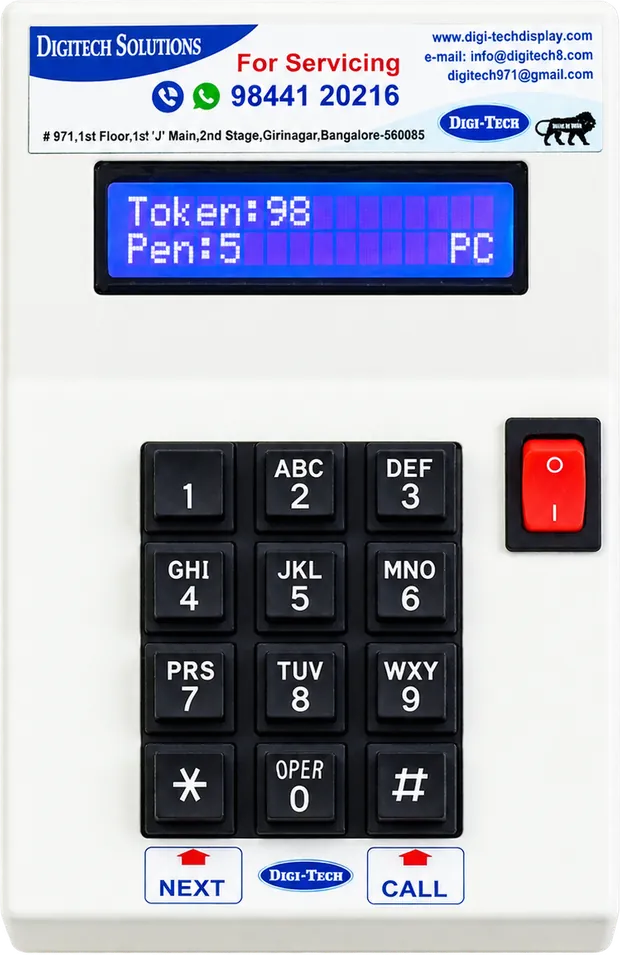
The calling unit
One per counter. Its 2×16 LCD shows the present token, how many are pending and whether the unit is connected — so a teller knows the queue without turning around.
The mobile app
Call, recall and forward a token from a phone — for the officer who moves between the loan desk and the counter, or a manager watching the hall.
The screens
Any LCD or LED television, or our 7-segment LED board — one per hall, all driven by the same system.
The mini server
A small machine in the branch holds the queues and every token record. No customer data, and nothing leaves the branch.
Our router
It creates the network the dispenser, screens and calling units run on — not the bank LAN, so IT security has nothing to clear.
Printer & token
Our thermal printer with auto-cut and a paper-end sensor, on 55 mm / 55 GSM rolls, printing your branch name on every token.
Token dispensers & rollsWhere it goes in the branch
Entrance
The dispenser or tab kiosk, so the token is taken before the customer reaches the counter line.
Main counter hall
The token display high on the wall or a pillar, readable from the seating.
Each counter
A calling unit with a 2×16 LCD showing present and pending tokens, or the mobile app.
Locker & loans
A second screen for the desks away from the main hall, on its own queue.
First floor
A parallel display for branches where accounts and advances sit above the banking hall.
Split screen
Half the screen for tokens, half for your product notices, deposit rates or a branch video.
What the branch can finally prove
Every token is recorded from the moment it is issued — when it was called, by which counter, and how long the customer waited. The running average sits in the footer of the display, so the hall sees the same number the manager does.
Per token
- Token number and service
- Issued date and time
- Last-call time
- Total wait, per token
- Counter that served it
- Hops, where a token was forwarded
Across the branch
- Tokens issued, by service
- Average customer waiting time
- Longest wait of the day
- Counter productivity
- Waiting-time trend across banking hours
- Load per queue and per counter
Cuts we are asked to build
- Footfall by hour and by day
- First-of-month and salary-day peaks
- Priority tokens served, and their wait
- Missed and recalled tokens
- Branch against branch, month on month
- A custom cut for your review
Everything downloads as CSV for any date range from the server in the branch — no cloud account, no per-seat licence, no customer data — and where a regional office wants the numbers in a dashboard, we build that integration.

Token journey

The day at a glance
On every queue system we make
Priority calling
Senior citizens, differently-abled customers and priority account holders take a priority token and are called to the counter first, automatically.
Automatic queue merging
Several counters serve one queue, and queues merge when a counter closes — nobody waits in front of an empty window.
Midnight reset, own serial ranges
Tokens reset at 12 AM, configurable, and each service can run its own range so two customers never hold the same number.
Voice in your language
English and every Indian regional language, with a built-in speaker, volume control and an on/off switch for a counter not in use.
The token is your letterhead
Date, time, service, token number, branch name and contact number — printed on every token and customisable.
Hardware you own
No subscription and no per-counter licence. It runs on a server in the branch and keeps calling tokens whether the internet is up or not.
The configuration, in full
- Models
- LCD Wireless for named services and reports · LED Wireless · LED Wired — all three run in branches
- Display
- Any LCD or LED television, or a 7-segment LED board — scrolling, 4-line, 6-line, constant or split screen
- Queues
- 15 services on a screen, 30 on a swipe, configurable to 100 — we recommend keeping a branch under 10
- Counters
- Up to 9 counters on the LED models; configurable on the LCD platform, with flexible counter mapping
- Average waiting time
- Live, in the footer of the LCD display, calculated from the branch's own tokens
- Token issuing
- Push-button dispenser (general + senior citizen), thermal printer with 6 queue buttons, or a tab touchscreen kiosk
- Paper roll
- 55 mm / 55 GSM with end sensor on our printers · 72 mm / 50 GSM on tab and POS printers
- Calling
- 2×16 LCD counter unit with keypad — present token, pending tokens and connectivity — or the mobile calling app
- Network
- A network our own router creates. Not the bank LAN, no CBS integration, no internet dependency — nothing for IT security to clear
- Customer data
- None. A token is a number: no name, no account number, no KYC data enters the system
- Power
- A 220 V point at each unit, on our own 5 A plug
- Announcement
- English and all Indian regional languages
- Reports
- Waiting time and counter analytics on an on-site server, CSV for any period; dashboard or HO integration on request
- In service at
- State Bank of India, Canara Bank, Karnataka Bank, HDFC Bank, UCO Bank, India Post, Union Bank of India, Bank of Baroda, Punjab National Bank, ICICI Bank
When a branch does not need this
One or two counters
A small branch or an extension counter needs a number on a wall, not a platform. Our token display system does that for a fraction of the cost.
You need the rate board
If the audit point is disclosure, the product is an interest rate board, a forex board or a locker display — not a queue system.
You want CBS integration
We do not touch core banking, and we would not advise a vendor who offers to. This system runs beside your CBS, holds no customer data, and needs nothing from it.
Bank queue management — common questions
What is a bank queue management system?
A bank queue management system replaces the line at the counter with a token and a display. The customer takes a token at the entrance — general, or senior citizen on a priority button — sits down, and is called to a counter by number, with a voice announcement, in the order the tokens were issued and with priority tokens first. In branch procurement it is also called a token system, a counter calling system, a token display system or customer flow management.
Does RBI require a queue management system in a bank branch?
No. RBI mandates display boards — interest rates, forex rates and service charges, current and visible at every branch. Queue management is a customer-experience investment, not a compliance line item: BCSBI's Code of Bank's Commitment to Customers expects reasonable waiting times and transparent service, but specifies no technology. We build both, and we keep the distinction straight in procurement; our guide to RBI display board compliance goes through it in detail.
How are senior citizens and differently-abled customers called first?
The dispenser carries a separate priority button. A token taken there is called ahead of the general queue automatically, so the preference does not depend on a teller's judgement or on a customer having to ask. Because it is a system rule, the report also shows how many priority tokens were served and how long they waited — which is the evidence a customer-service review wants.
Does it run on our bank network, and does it touch CBS?
No to both. Our own router creates the network the dispenser, display and calling units run on — no bank LAN, no CBS integration, no internet dependency, and nothing for IT security to clear. It holds no customer data either: a token is a number, with no name, account number or KYC data anywhere in the system. If the branch link goes down, tokens keep being issued and called.
Can any counter call any token, and what happens when a counter closes?
Yes — counters share a queue, so a waiting token goes to whichever counter frees up first, which is what makes single-window operations work at the counter rather than only on paper. When a counter closes for lunch or for the day, its queue merges into the others instead of leaving customers in a line in front of an empty window.
What reports does a branch or regional office get?
Tokens issued by service, average customer waiting time, longest wait of the day, counter productivity, the waiting-time trend across banking hours and the load on each queue — with the journey of every token behind it. Reports download as CSV for any date range from a server in the branch, so a regional office can compare branches on the same measure, and we build any additional cut you need for a review.
Send us the branch, we will specify it
Counters, services and where the screen goes — a specified quotation comes back within one business day, with a rollout plan if it is more than one branch, from the company that has been building branch queue systems since 2001.