
Wireless call bell system
Secure RF calling with a range of roughly 70 to 100 metres and no cabling at all — in two models. One lights a numbered zone LED; the other shows the actual room, bed or shop-floor number on a 7-segment display.
A true plug-and-play system — no wiring, no configuration, no installation charges. Also sold as a calling bell system, patient call bell, peon calling system, attendant or caretaker calling system — for hospitals, elder care and senior living, homes, factories, offices and hospitality.
A light, or a number
Both use the same radio, the same range and the same idea. The only question is whether your staff need to read the exact room or machine that called.
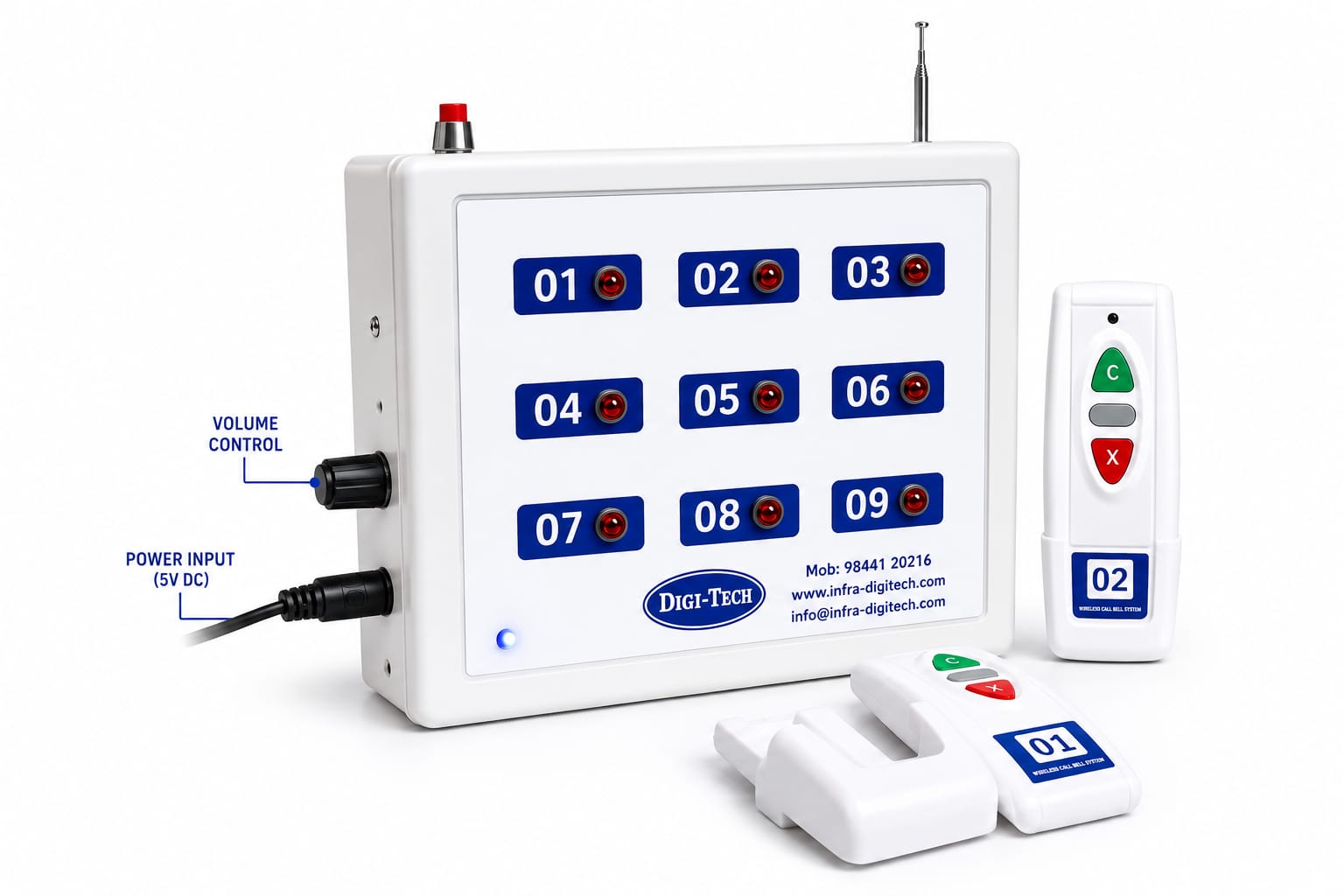
Wireless LED
A numbered LED lights up for the unit that called.
See details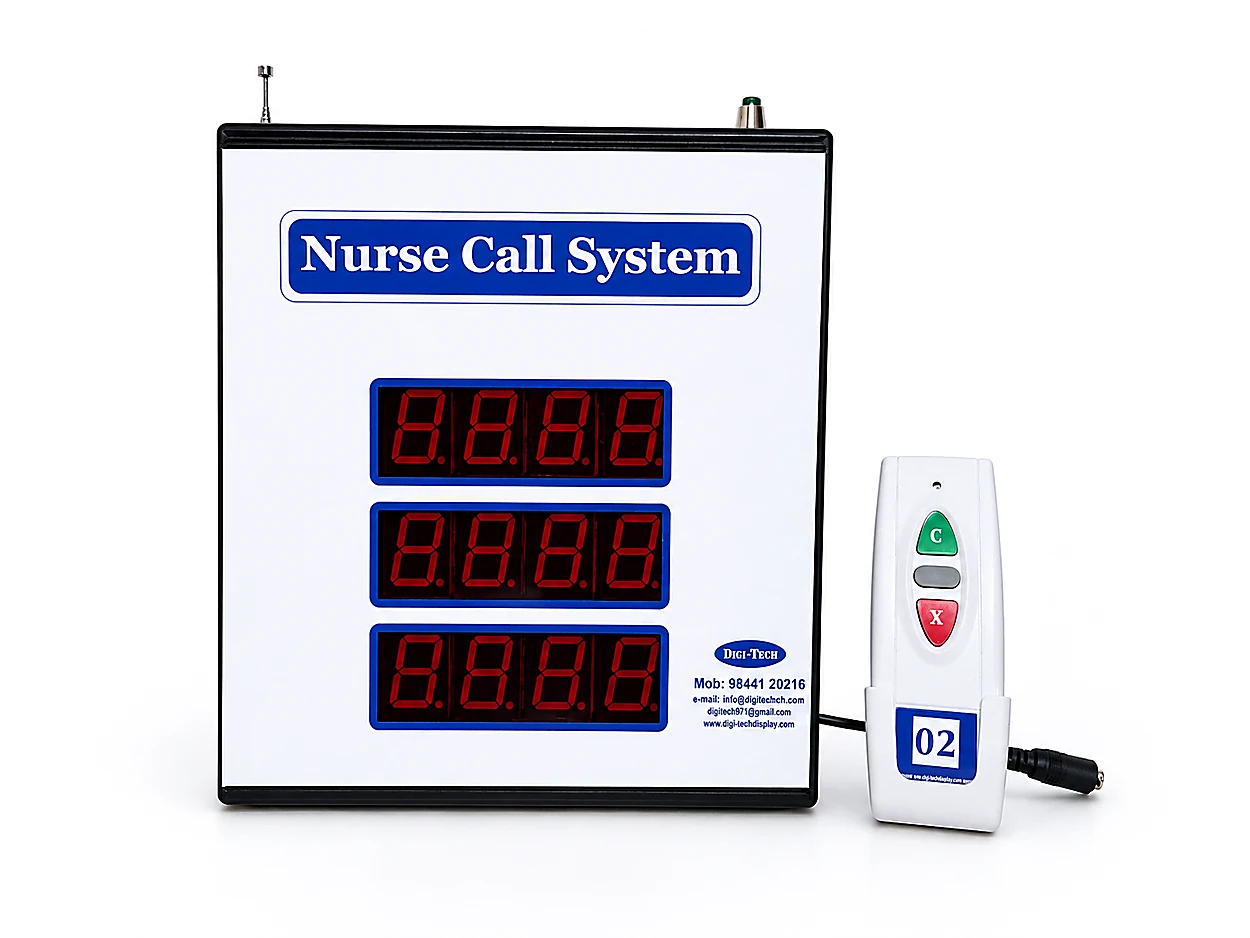
Wireless Display
The panel shows the actual room, bed or zone that called.
See details| Feature | Wireless LED | Wireless Display |
|---|---|---|
| What the station sees | Zone LED (01–09) | Room / bed / zone number |
| Identifies the exact room | ||
| Alphanumeric IDs (e.g. 208A) | ||
| Simultaneous calls visible | One per zone LED | Three, in arrival order |
| Wireless range | 70–100 m | 70–100 m |
| Dedicated emergency button | ||
| Call restored after power cut | ||
| Calling unit | 3-button remote | Hand-held Call / Reset |
| Typical capacity | 9 units | Ask us for your layout |
| Relative cost | Lowest | Higher — you are buying the display |
Included Not applicable Ask us — depends on configuration
Wireless LED Calling System
The simplest and most economical of the two. Battery-operated remotes send a call over secure RF radio to a nine-zone receiver panel, where a numbered LED lights for the unit that called and a buzzer sounds until it is reset. There is no display to read — you identify the caller from which LED is lit, which is all you need when there are only a handful of call points and the staff member can see the whole area. It is genuinely plug-and-play: power the panel from a 5 V adapter, hand out the remotes, done.
- Nine-zone LED receiver panel — a high-visibility red LED per calling unit (01–09)
- Three-button remote — C in green for a normal call, the middle button for an emergency call, X in red to reset
- Telescopic antenna on the receiver panel for reliable reception across the area
- Non-volatile call memory — the active call is restored after a power cut
- Side-mounted adjustable buzzer volume, for a quiet ward or a noisy shop floor
- Reset from the remote or from the panel's own dedicated reset switch
- Wall-mount clip holders so remotes stay put beside a bed, counter or machine
- Compact 5 V DC operation — runs off an ordinary adapter, place it anywhere
Best for: Clinics, small wards, offices, single shop floors, hotels, service centres and retail counters — up to nine call points in an area staff can see
Wireless LED specifications
- Connectivity
- RF wireless — no communication cabling
- Range
- Approx. 70–100 m (site dependent)
- Panel
- 9-zone LED (01–09) — per-unit red LED
- Indication
- Zone LED latched until reset + audible buzzer
- Calling unit
- 3-button battery remote — C (call) · middle (emergency) · X (reset), with wall-mount clip holder
- Antenna
- Telescopic antenna on the receiver panel
- Call memory
- Non-volatile — restored after power interruption
- Volume
- Side-mounted adjustable control
- Power
- 5 V DC adapter (panel) · battery (remotes)
Wireless Display Calling System
Technically the same RF system — the single difference is what your staff read. Instead of a zone LED, a three-line 7-segment panel displays the actual identifier that called: a room like 208A on a ward, or a machine or shop-floor zone in a factory. That difference stops mattering theoretically and starts mattering practically the moment you pass a handful of call points, because nobody has to translate zone 4 into a room number in their head at two in the morning. Three calls stay on the display at once, in the order they arrived, so a queue is visible rather than remembered. This is also the system we supply as the Attendant Calling System and the Senior Living Calling System.
- Three-line 7-segment LED panel — shows the calling room, bed or zone
- Alphanumeric identifiers supported, so 208A and 208B are distinct
- Up to three simultaneous calls visible in arrival order
- Hand-held calling unit with Call and Reset buttons
- Identifiers mapped to your own room or machine numbering, not a fixed sequence
- Also supplied as an Attendant Calling / Senior Living Calling System
Best for: Larger wards, nursing and old-age homes, senior living, and factories where staff must know exactly which room, machine or shop floor is calling
Wireless Display specifications
- Connectivity
- RF wireless — no communication cabling
- Range
- Approx. 70–100 m (site dependent)
- Panel
- 3-line 7-segment LED — identifier per line
- Identifiers
- Numeric and alphanumeric (e.g. 208A)
- Calling unit
- Hand-held Call / Reset unit
- Indication
- Number latched on display + audible alert until reset
- Capacity
- Configured to your layout — ask us
- Power
- 220 V AC panel · battery calling units
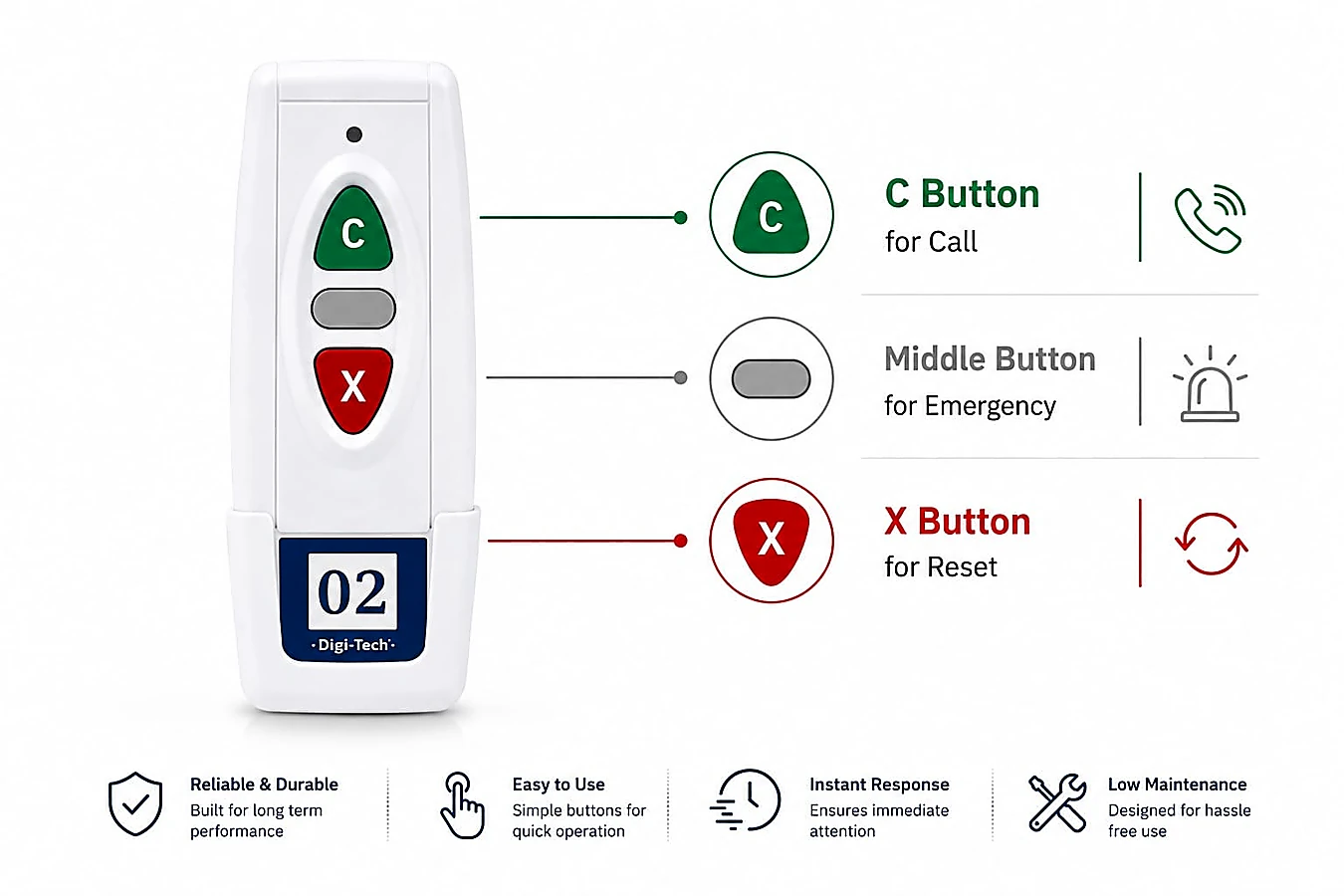
One remote, whichever panel you choose
The hand-held unit is identical on both models. That matters more than it sounds: a facility running an LED panel on one floor and a display panel on another keeps one spares kit, trains staff once, and can move a unit between floors without anybody relearning anything.
Three buttons, and no menus — which is the whole point when the person pressing it is elderly, unwell, or in the dark.
- C
Call
The everyday button. One press puts that unit's number up on the panel and sounds the alert at the station.
- •
Emergency
The middle button, deliberately different in shape and colour so it is not pressed by mistake in the dark.
- X
Reset
Clears the call once somebody has attended, so the panel shows only what is still waiting.
What 70–100 metres means in your building
Wireless range is always quoted for ideal conditions. Here is what actually changes it, so you can judge your own site before we ever visit.
What gives you the full 100 m
Open corridors, single-floor layouts, light partitions, drywall and glass. A ward corridor, an office floor or an open shop floor will typically reach the upper end of the range comfortably.
What reduces it
Thick masonry and RCC walls, lift shafts and stairwells, metal racking, large machinery and basement levels all absorb signal. In these conditions plan closer to the 70 m figure, or split the coverage.
Multiple floors
RF passes between floors but a concrete slab costs you range. For a two-storey nursing home a single panel is often enough if it is mounted centrally; for larger multi-floor buildings we would normally place a panel per floor or per wing.
How we confirm it
For anything larger than a straightforward single-floor layout we walk the site and test actual coverage from the intended panel position before quoting — so the range you get is measured, not assumed.
From carton to working system
Units are paired and numbered before dispatch, so there is nothing to configure on site — no wiring, no conduits, no civil work and no installation charges. The system is two parts only: a receiver panel and the calling units.
Position the panel
Wall-mount or stand the receiver panel where staff are — the nurse station, the maintenance desk, the reception counter or the supervisor cabin. It needs only a power socket.
Place the calling units
Fix the wall-mount holders beside each bed, machine, counter or workstation, or hand the remotes out to residents. Each unit is numbered or mapped to its room or zone.
Power it up
The panel and units are paired and labelled before dispatch, so there is no configuration on site. Power the panel and the system is live.
Expand when you need to
Adding a call point later means adding a unit and mapping it — no cabling, no downtime, no revisiting the original installation.
On batteries: the calling units only draw power when a button is pressed, so cells last a long time in normal use. Keep a few spares and change them on a routine schedule. If you would rather have nothing to replace at all, the wired system uses mains-powered call points.
One system, many industries
Healthcare
- Clinics and small hospitals without Code Blue or NABH requirements
- Nursing homes, maternity homes and polyclinics
- Wards being retrofitted without closing them
- Day-care surgery and diagnostic centres
Elder care & senior living
- Old-age homes and assisted living
- Retirement communities and senior apartments
- Residents calling a caretaker from anywhere in the building
- Palliative and long-stay rooms
Industry
- Calling a CNC operator back to a machine
- Breakdown calls to maintenance — the display shows which machine or floor
- Material handler and forklift calls from a workstation
- Warehouse pickers calling a supervisor from the aisle
Offices, hospitality & retail
- Peon and attendant calling from cabins and meeting rooms
- Restaurant table service and kitchen-to-waiter calling
- Hotel housekeeping and room service
- Showroom counters and service-centre bays
Wireless — common questions
Range, batteries, interference and expansion — the things buyers actually ask before committing to wireless.
What is the range of the wireless call bell system?
Approximately 70 to 100 metres in typical conditions. The upper figure applies to open corridors, office floors and light partitions; thick masonry, RCC walls, lift shafts, metal racking and basement levels bring it down toward 70 metres or below. RF does pass between floors, but a concrete slab costs range — so for larger multi-floor buildings we usually place a panel per floor or wing. For anything beyond a simple single-floor layout we test actual coverage on site before quoting.
Which wireless model should I choose — LED or display?
Choose the LED model when you have up to about nine call points in an area the staff member can see, and knowing 'zone 4 is calling' is enough. Choose the display model as soon as staff need to read a real room, bed or machine number — typically larger wards, senior living facilities with many rooms, or a factory floor where walking to the wrong machine wastes real time. The display model also shows three calls at once, so a queue is visible rather than remembered.
Is a wireless call bell the same as a peon calling system?
Yes — same hardware, different industry vocabulary. In a hospital it is a call bell or nurse call bell; in an office it is a peon calling system or staff calling system; in elder care it is an attendant calling system; on a shop floor it is a maintenance or supervisor calling system; in a restaurant it is a table or waiter calling system. Only the labelling of the calling units changes.
How long do the batteries in the calling units last?
The calling units only draw power when a button is pressed, so in normal use a battery lasts a long time — in practice most facilities replace them on a routine schedule rather than on failure. We recommend keeping a few spares on site and checking units during regular maintenance. If battery-free operation matters to you, the wired model uses mains-powered call points instead.
Will other wireless equipment interfere with it?
The system uses secure RF communication on its own channel rather than sharing your Wi-Fi, so ordinary office and hospital Wi-Fi, phones and Bluetooth devices do not compete with it. In heavy-industrial environments with large drives and welding equipment we assess the electrical noise on site as part of the survey.
Can we add more calling units later?
Yes — that is one of the main advantages of going wireless. Adding a call point means adding a unit and mapping it to the panel, up to the panel's capacity. There is no cabling, no civil work and no downtime for the existing installation, so facilities routinely start with one ward, floor or line and extend as they grow.
What happens if the power fails while a call is active?
The wireless LED receiver panel has non-volatile memory that stores the active call and restores it automatically when power returns, so a call raised just before an outage is not lost. For sites with frequent outages we recommend backing the panel with a small UPS.
Considering wired instead?
If cabling is already going in, or you would rather have no batteries at all, the wired system may suit you better — and we will say so.