
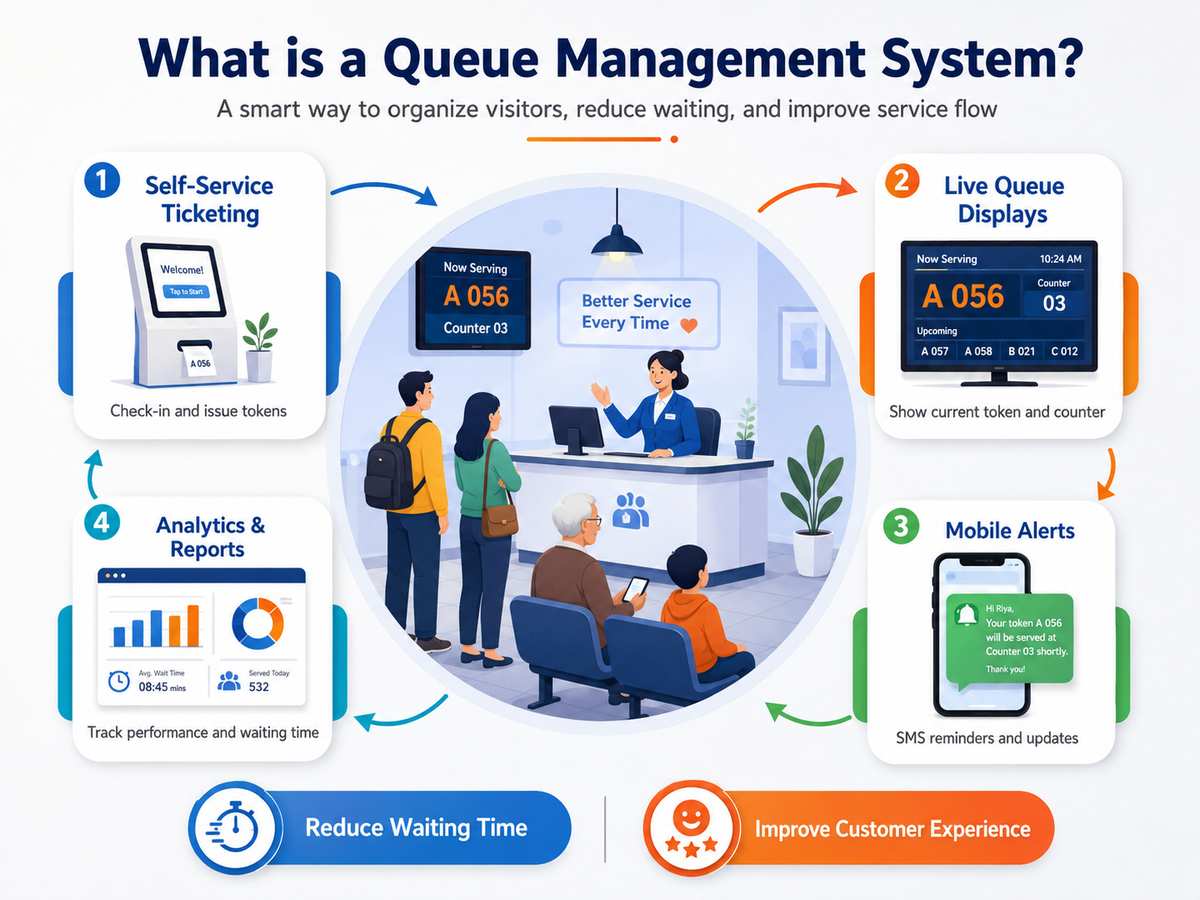
Every crowded counter in India - a hospital OPD, a bank branch, a government office, a pharmacy - eventually faces the same choice: keep managing people standing in line, or manage the queue electronically and let people sit. A queue management system (QMS) is the machinery behind the second option. We have manufactured them in Bengaluru since installing India's first retail-banking QMS at SBI in 2004, so this guide explains the subject the way we explain it to buyers: plainly, component by component.
What is a queue management system?
A queue management system is a set of connected devices - and optionally software - that converts a physical waiting line into a numbered, orderly flow. Instead of standing in a queue, a visitor takes a token (a printed slip from a dispenser or kiosk), sits in the waiting area, and is called to a specific counter when their turn arrives - by a display board showing the token and counter number, usually with a voice announcement. Staff control the flow with a small calling unit at each counter, and supervisors can see wait times and counter performance in reports.
The result is the same everywhere it is deployed: no crowding at counters, no arguments about who came first, calmer visitors, and measurable service times. That is why the same core system runs in hospitals, banks, clinics, telecom stores, passport offices and food courts.
The components, one by one
- Token dispenser or kiosk - issues the printed token with number, date and time. Formats range from a wall-mount dispenser to a touch-screen TAB kiosk where visitors pick a department or service.
- Counter calling unit - a small keypad at each counter with NEXT and RECALL keys; staff press it when free, and the system assigns the next token to that counter.
- Customer displays - the LED board or LCD screen in the waiting area showing which token should go to which counter; multi-counter halls use a main display plus counter-top units.
- Voice announcement - speaks the token and counter number aloud, in English and regional languages, so nobody misses a turn while looking at a phone.
- System hub - the controller that connects everything (wired RS-485 or fully wireless over Wi-Fi/RF) and keeps the queue state.
- Reports and dashboard - on the LCD platform, token counts, average waiting time and per-counter service time, exportable for management review.
How the token flow actually works
- 1A visitor arrives and takes a token - from the dispenser, or by choosing a service on the kiosk. The slip shows their number and the time.
- 2They sit down. The waiting area display shows tokens currently being served at each counter.
- 3A counter finishes and the staff member presses NEXT on the calling unit.
- 4The system assigns the next waiting token to that counter, updates the display, and announces it aloud.
- 5If the visitor does not appear, RECALL repeats the announcement; the token can be skipped or re-queued per policy.
- 6Every event is timestamped, which is where wait-time reports and service analytics come from.
Types of queue management systems
- Standalone token display - a single counter with a 3- or 4-digit display and a calling keypad; in clinics this is the classic doctor display. The simplest and most affordable entry point.
- LED queue management system, wireless or wired - 7-segment LED display, token dispenser with auto-cutter, up to around 6 queues; the workhorse for pharmacies, mid-size OPDs, branch offices and billing counters. Ours are LED Wireless (zero cabling) and LED Wired (6-core cable).
- Advanced LCD queue management system - LCD screens with named queues, TAB or floor-standing kiosks, multi-language voice, flexible counter mapping across dozens of queues, and reporting; built for banks, large OPDs and government service centres. Ours is the LCD Wireless platform.
- Federated multi-dispenser systems - several dispensers and counter groups under one supervisor dashboard for airport-scale or campus-scale crowds; this is how deployments at Kempegowda International Airport and Passport Seva Kendras are architected.
- Software and virtual queues - app- or SMS-based tokens without physical dispensers; useful as an add-on, though most Indian counters still need the physical display and voice because walk-ins dominate.
Hardware vs software vs open source - an honest note
Plenty of searches ask about open-source or free queue management software, and the honest answer is: the software is rarely the hard part. A queue that works in a real Indian waiting hall needs a physical token in the visitor's hand, a bright display they trust, a loud announcement in their language, and a calling unit that never crashes at 11 am on a Monday. Open-source projects can generate numbers on a screen, but you still need the dispensers, displays, calling units, speakers and the integration between them - plus someone to service all of it for years. That is exactly what a manufactured hardware QMS is. Where software shines is on top of the hardware: dashboards, reports and multi-branch views.
Where queue systems earn their keep
- Hospitals and clinics - OPD registration, billing, pharmacy and lab counters; token forwarding can carry one token across departments. See our healthcare solutions at /sectors/healthcare.
- Banks and NBFCs - multi-counter branch halls; our SBI deployments even display the live expected waiting time. See /sectors/bfsi.
- Government and public service - Aadhaar Seva Kendras, passport offices, municipal counters. See /sectors/corporate.
- Retail and food courts - order-ready displays and billing queues. See /sectors/retail.
- Airports and transit - federated, high-volume deployments. See /sectors/airports.
How to choose the right system
- 1Count your counters and daily footfall - one counter needs a token display, not a full QMS; six billing counters need a standard system; a 15-counter OPD needs an advanced one.
- 2Decide wired vs wireless - wireless installs in a day with power only at the printer and display; wired suits new construction.
- 3Insist on voice announcement in your visitors' languages - it is the single biggest calmness upgrade in a crowded hall.
- 4Ask about reports - if management will ever ask 'how long do patients wait', you want a system that logs every token.
- 5Check the service story - who answers when a printer jams, and are spares available five years from now?
- 6Budget realistically - complete wireless systems in India start around forty-five thousand rupees for standard LED configurations, around fifty thousand for wireless LCD, and around sixty thousand for TAB-kiosk dynamic systems, scaling with counters and displays.
For the full cost breakdown by configuration, read our detailed pricing guide - or see the Queue Management System tiers we manufacture.
Read the QMS price guideWhy buyers pick Infra DigiTech
We are the Bengaluru manufacturer behind India's first retail-banking queue management system (SBI, 2004), with two decades of deployments across hospitals, banks, government service centres and Kempegowda International Airport. We build the hardware, write the firmware and software, install, and answer our own service line - one accountable partner from token to report. Explore the product at /queue-management-system or talk to our team for a same-day quotation.
Frequently asked questions
What is a queue management system?
A queue management system is a connected set of devices - token dispenser or kiosk, counter calling units, customer displays, voice announcement and a system hub - that converts a standing line into a numbered token flow. Visitors take a token, sit, and are called to a specific counter by display and announcement, while the system logs wait and service times.
How does a token queue system work?
A visitor takes a printed token, waits seated, and staff press NEXT on a counter calling unit when free. The system assigns the next token to that counter, shows it on the display and announces it aloud. RECALL repeats an announcement, and every event is timestamped for reports.
Do I need a full queue management system, or is a token display enough?
A token display is a single-counter device - one display and one calling keypad, like the doctor display in clinics. A queue management system adds token dispensers or kiosks, multiple counters and queues, voice announcement, routing and reporting for multi-counter environments like bank branches and hospital OPDs.
Is free or open-source queue management software good enough?
Open-source software can generate token numbers, but a working queue in a real waiting hall also needs dispensers, bright displays, voice announcement, reliable calling units and years of service support - the hardware. Most buyers are better served by a manufactured hardware system, with software dashboards layered on top where needed.
What should I budget for a queue management system?
Complete wireless systems typically start around Rs 45,000 for standard LED configurations, around Rs 50,000 for wireless LCD, and around Rs 60,000 for TAB-kiosk dynamic systems, scaling with counters, displays and software features. Standalone single-counter token displays cost much less. See our detailed 2026 price guide for full configuration-wise costs.
Which queue management system is best for a hospital OPD or a bank branch?
A mid-size OPD or pharmacy is well served by our LED Wireless system supporting up to six queues (LED Wired where the site prefers cable); large OPDs, banks and government service centres should choose the LCD Wireless platform with the TAB kiosk, multi-language voice, flexible counter mapping and reporting. Single-doctor clinics only need a token display.